
Cost of Living Allowance Report Calculator
2026-09-03
This article explains what a cost of living allowance is and how Xpatulator’s Cost of Living Allowance report calculator estimates the additional allowance required, over and above current salary, to maintain spending power when moving between locations. It sets out why the report is useful for global mobility specialists, particularly for short term assignments, by making policy choices transparent and by allowing costs provided outside salary to be excluded through basket allocations. It concludes with a practical step by step guide covering subscription access, location selection, settings, advanced options, salary input and report retrieval.
Cost of Living Allowance Report Calculator Guide for Global Mobility Specialists
A cost of living allowance is an additional payment paid on top of an employee’s existing salary to protect purchasing power when living costs in the host location are higher than in the home location. In mobility practice it is most often used for international assignments, where the aim is to keep the employee broadly no worse off for day to day spending on comparable goods and services.
Xpatulator’s Cost of Living Allowance report calculator is built for that purpose. It estimates the additional allowance required, over and above the current salary, to compensate for cost of living differences, relative hardship, and exchange rate effects, so that the employee can maintain similar spending power and a comparable standard of living to that of the home location. Xpatulator's platform is an online set of calculators and reports designed to support cost of living indices, allowances, and assignment package calculations across a large set of global locations.
For a global mobility specialist, the value is in producing a consistent, auditable starting point for short term assignments and temporary moves. The report helps you quantify the cost driven element of an assignment package without relying on a single exchange rate conversion or an informal comparison of prices. It also supports policy discussions, because it makes the key choices explicit, including whether lower host costs can reduce the allowance, and whether lower hardship should reduce pay requirements. That discipline matters when you need to explain outcomes to finance, reward, and line leadership, or when you need comparable treatment across a population.
Xpatulator also structures the calculation through basket groups, so you can model what costs are expected to be paid from salary and what costs are provided directly by the employer or state. This matters because the practical question is not simply whether a location is expensive, but which costs the employee will actually carry in cash. Xpatulator organises cost of living and related data from a wide range of sources, and ensures the datasets are quality assured before being added to the platform.
Step by step guide to running the Cost of Living Allowance report
Log in using your username and password.
Confirm you have an active subscription that includes the Cost of Living Allowance Calculator Report, such as Standard or Premium.
Select Cost of Living Calculators on the left hand menu.
Choose Cost of Living Allowance.
Select locations. Choose the home country and location and the home currency. Then choose the host country and location and the host currency.
Select settings. Decide whether to allow negative hardship differences. If enabled, the allowance can reduce when hardship is lower in the host location. If disabled, only higher hardship in the host location increases the allowance.
Decide whether to allow negative cost of living differences. If enabled, the allowance can reduce when the cost of living is lower in the host location. If disabled, only higher host costs increase the allowance.
Review advanced settings. In most cases keep the default weights and basket methodology unless your policy requires a specific adjustment.
Set cost allocations. Switch off basket groups that are provided outside salary by the employer or state, so you do not double count those benefits in the allowance. If every basket is excluded, the logic of the allowance largely falls away because the employee would not be funding typical living costs from salary.
Enter salary. Input the current salary amount in the home location as the basis for the calculation. Use the pay definition that matches your policy, and apply it consistently across the assignee population.
Run the calculation. Click run calculation once the inputs reflect the assignment policy and the employee’s situation. Retrieve the report later from the report menu, where reports are stored automatically.
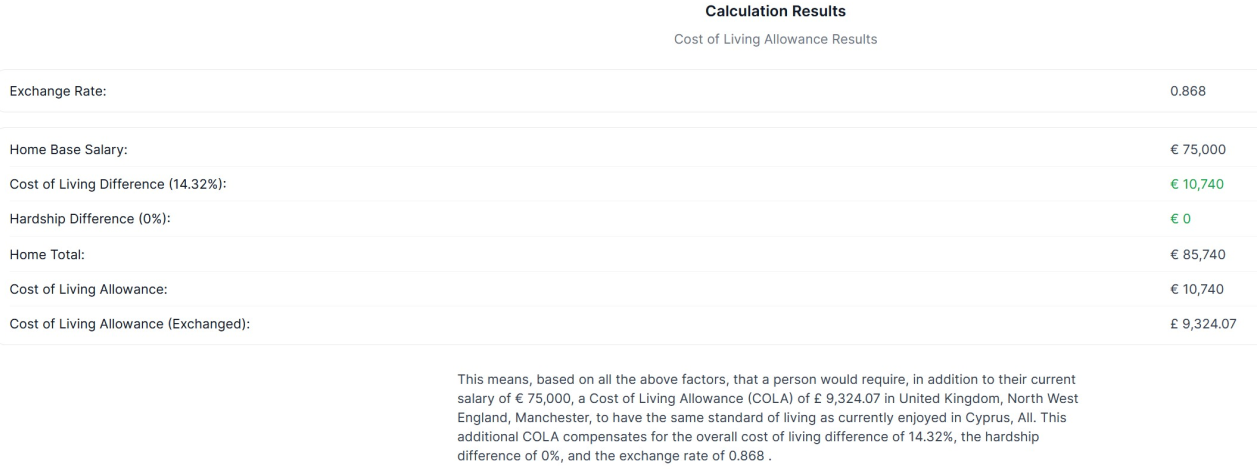
The results include the below example
Used properly, the report gives you a defensible allowance baseline, while leaving room for judgement on items that sit outside general spending, such as housing policy, education support, tax equalisation, and any role based premiums.
Use Xpatulator’s Cost of Living Calculators and Tools for informed decision making about the cost of living and the salary, allowance and assignment package required to maintain the current standard of living.