
Cost of Living Index Report Calculator
2026-09-03
This article explains the purpose of a cost of living index and how Xpatulator’s Cost of Living Index report calculator produces index values for multiple host locations relative to a chosen home base of 100. It outlines why a global mobility specialist would use a multi location index report to support location comparisons, policy decisions and early stage budgeting, and it emphasises the practical importance of basket selection and cost allocations so the index reflects costs that employees actually pay from salary. It concludes with a clear step by step guide to running and saving the report.
Cost of Living Index Report Calculator Guide for Global Mobility Specialists
A cost of living index is a numerical way of comparing living costs either across time or between locations. In practice, most cost of living indices compare a defined set of typical expenses, such as housing, food, transport and healthcare, and express one location as a base so other locations can be measured relative to it.
Xpatulator’s Cost of Living Index Report Calculator is designed to create this type of comparison at scale. You set one home location as the base location, and the calculator produces cost of living index values for the host locations you select, using the home location index as 100. Host locations that are more expensive than the home location will have an index above 100, and host locations that are cheaper will have an index below 100. Xpatulator using local prices for over 200 goods and servces, converted to USD, grouped into 13 cost of living basket groups, allowing users to build customised indices depending on which costs are relevant to the employee population being analysed.
For global mobility specialists, the operational advantage is the ability to build a consistent index set across multiple destinations in one report. This is particularly useful when you are managing a portfolio of assignment locations, comparing regional hubs, or setting policy reference points for allowances and package design. A multi location index report can support early stage decisions, such as which destinations are likely to require higher allowances, where assignment budgets may be under pressure, and which locations can be treated similarly for policy purposes. It also helps when communicating with finance and business leaders, because the index format is intuitive and comparable across locations.
The calculator’s basket structure matters in mobility work because the relevant cost drivers depend on what the employee will actually fund from salary. If housing, schooling or transport are provided directly by the employer, including those costs in the index can distort decision making. Xpatulator’s cost allocation settings are intended to let you exclude basket groups that are not paid from salary, so the index reflects the costs that drive spendable income pressure for the assignee. Xpatulator uses a wide range of data sources and the data is quality assured before being uploaded, with indices aimed at international professionals and managers.
Step by step guide to running the Cost of Living Index report
Log in using your username and password.
Confirm you have an active Premium subscription, as the Cost of Living Index report calculator is positioned as a Premium feature.
Select Cost of Living Calculators on the left hand menu.
Choose Cost of Living Index.
Select locations. Choose the home country, and location. This home location becomes the base with an index of 100. Select up to 50 host locations to be compared to the base.
Review advanced settings. In most cases, keep the default basket weights and methodology unless you have a clear policy requirement to adjust them.
Set cost allocations. Switch off basket groups that will be provided by the employer or state and are not expected to be paid from salary. This helps avoid double counting benefits outside salary and keeps the index aligned to the employee’s spendable costs.
Complete report information. Enter a clear report name so it can be retrieved later without ambiguity, particularly when you run multiple reports for different populations or policy scenarios.
Create report. When your criteria are correct, select create report. Reports are stored in the report area for later access.
The results include the below examples and includes the overall index comparisons as well as the detailed basket breakdown for each location:
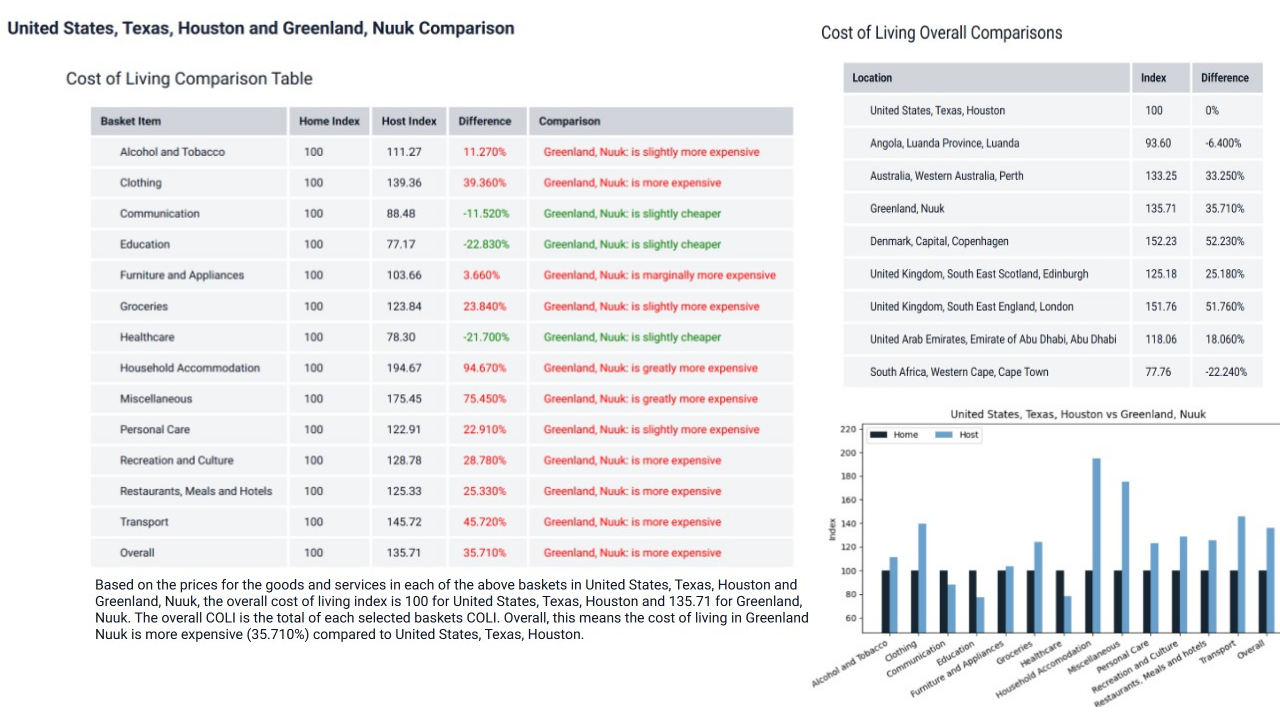
Used well, a cost of living index report becomes a practical reference tool. It can inform salary purchasing power comparisons, allowance modelling, assignment budgeting and policy segmentation, while still leaving room for judgement on items that sit outside general consumption, such as housing norms, security requirements, tax policy, or role based premiums.
Use Xpatulator’s Cost of Living Calculators and Tools for informed decision making about the cost of living and the salary, allowance and assignment package required to maintain the current standard of living.