
International Assignment Management Report Calculator
2026-09-03
This article explains international assignments and the role of international assignment management in designing pay and benefits that are workable for employees and viable for employers. It describes how Xpatulator’s International Assignment Management report calculator supports a home based, build up or balance sheet approach by incorporating cost of living indices, exchange rates, hardship, expatriation premium, and benchmark housing and transport allowances, with optional hypothetical personal income tax. It concludes with a clear step by step guide to running the report using location selection, family and job level settings, cost allocations, salary input, and policy percentages.
International Assignment Management Report Calculator Guide for Global Mobility Specialists
An international assignment is a work arrangement where an organisation sends an employee from their home country to work in a host country for a defined period. The employee is commonly referred to as an expatriate. International assignment management is the end to end process of planning, approving, and managing that move, including the compensation and benefits that make the assignment workable for the employee and affordable for the organisation.
In many organisations, assignment pay is built using a home based approach, often referred to as the build up approach or the balance sheet approach. The underlying idea is to maintain broad equity for the employee by protecting home purchasing power and addressing assignment specific costs through defined allowances and premiums, rather than simply switching the employee to local host payroll terms.
Xpatulator’s International Assignment Management report calculator is designed to support this approach. The report is a structured method for managing expatriate transfers using a build up or balance sheet framework, with the aim of fair and financially viable outcomes. The calculator combines inputs and benchmarks that are commonly considered in assignment design, including hypothetical personal income tax, cost of living index, hardship premium, exchange rate impact, expatriation premium, benchmark housing allowance and benchmark transport allowance.
For a global mobility specialist, the practical value is consistency and traceability. A calculator driven report provides a repeatable framework across assignees, job levels, and family scenarios, which helps reduce ad hoc negotiation and makes governance easier. It also supports collaboration with Reward, Finance, and Tax stakeholders, because the key levers are visible and can be tested. This matters when you need to compare home and host outcomes, explain drivers of cost, and demonstrate that packages align to policy rather than individual preference. The report is positioned for typical expatriate assignments of six months up to five years, which fits many long term mobility programmes.
The calculator also prompts decisions that materially affect outcomes. Family size and job level influence the structure of allowances and the share of income treated as spendable. Concepts such as spendable income are central to home based models, where cost of living indices are applied to the portion of pay typically spent on goods and services. Settings for hypothetical personal income tax allow you to run a gross comparison or a tax affected comparison, depending on policy intent. Cost allocations help prevent double counting by excluding baskets provided outside salary, such as employer provided housing or transport.
Step by step guide to running the International Assignment Management Report
Log in using your username and password.
Confirm you have an active Premium subscription, as this report is positioned as a Premium calculator.
Select Cost of Living Calculators on the left hand menu.
Choose International Assignment Management.
Select locations by choosing the home country, location, and currency, then the host country, location, and currency.
Select settings by choosing the number of dependent children and the assignee job level, then choose whether to include hypothetical personal income tax in the home and host calculations.
Review advanced settings and, in most cases, keep the default weights and basket methodology unless policy requires otherwise.
Set cost allocations by switching off basket groups that will be provided by the employer or state, so those costs are not treated as paid from salary.
Enter salary by inputting the current salary amount in the home location, using the pay definition aligned to your policy.
Enter the expatriation premium as a percentage of home net salary to support mobility, noting that some guidance sources describe foreign service premiums within a broad range that can reach the mid teens depending on policy and context.
Enter the home net balance percentage to reflect the portion of home net salary expected to remain committed to the home location.
Enter the host essential spending percentage to reflect the portion of home net salary expected to be used in the host location.
Run the calculation once inputs reflect the assignee scenario and policy intent, then retrieve the report from the report menu, where reports are stored automatically.
Below is an example of a section of the report for an International Assignment Buildup from Washington DC to London:
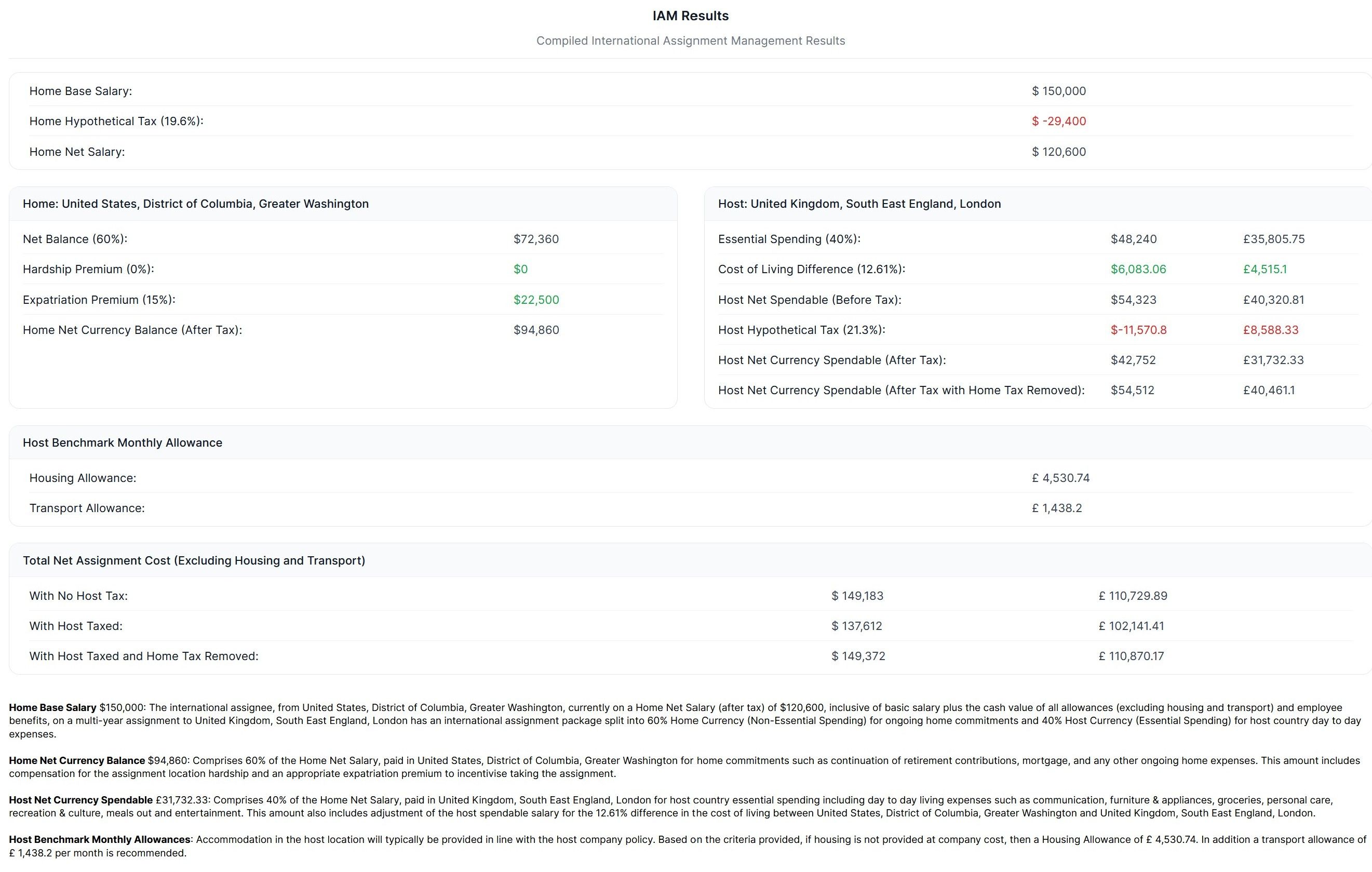
Total Net Assignment Cost expresses, in one figure, the combined net cost required to sustain the assignee across home and host locations under different tax treatments.
- With no host tax applied, it is calculated as Home Net Currency Balance after tax plus Host Net Spendable before tax, reflecting a scenario where host taxation is not deducted from the host spendable amount.
- With host tax applied, it is calculated as Home Net Currency Balance after tax plus Host Net Currency Spendable after tax, reflecting the reduction in host spendable caused by host personal income tax.
- With host taxed and home tax removed, it is calculated as Home Net Currency Balance after tax plus Host Net Currency Spendable after tax with home tax removed, which is intended to show host net spendable after host taxation while removing the effect of home tax, supporting analysis where home tax is not treated as a continuing cost in the host spendable component.
Used well, the report provides a coherent baseline for the cost and allowance elements of an assignment package, while leaving room for policy judgement on items such as housing standards, security requirements, tax equalisation, and role related premiums.
Use Xpatulator’s Cost of Living Calculators and tools for informed decision making about the cost of living and the salary, allowance and assignment package required to maintain the current standard of living.