
Salary Purchasing Power Parity Report Calculator
2026-09-03
This guide explains purchasing power parity as a way to compare living costs across locations, then shows how Xpatulator’s Salary Purchasing Power Parity report calculator converts that concept into a practical salary comparison for relocations. It sets out how the calculator helps global mobility specialists evaluate offers and build assignment packages by accounting for cost of living, hardship and exchange rate effects, with optional inclusion of hypothetical personal income tax. The article concludes with a clear step by step process covering location selection, settings, cost allocations, salary input and report retrieval.
Salary Purchasing Power Parity Report Calculator Guide for Global Mobility Specialists
Purchasing power parity is an economic approach used to compare currencies through differences in local prices. In simple terms, it asks what it costs to buy a comparable basket of goods and services in two places, and then relates that to currency values. It is widely used to interpret cost of living differences across countries, where market exchange rates alone can be misleading because many everyday costs are local and non traded.
Xpatulator’s Salary Purchasing Power Parity report calculator applies this logic to pay. It calculates the salary needed in a destination location to maintain comparable purchasing power to the salary in the current location, after considering cost of living differences, exchange rate effects, and hardship differences. The output is designed to support a like for like comparison between two locations when an employee is moving internationally, or between regions within a large country. Xpatulator positions its tools as an online way to calculate cost of living indices, salaries and allowances for relocations, based on its organised cost of living baskets and underlying data sources.
For a global mobility specialist, the practical value is speed with structure. You can use the report to test whether an offer in the host location is genuinely higher or lower in purchasing power terms, rather than relying on exchange rates or headline salary alone. It can also support assignment package design by separating the components that drive changes in required pay, such as higher everyday costs, adverse currency movements, or tougher living conditions captured through hardship ratings. This is particularly useful when you need consistent treatment across assignees, or when internal stakeholders require a transparent rationale for allowances.
Xpatulator’s wider methodology groups costs into basket groups so you can model what the employee will actually pay for from salary, and exclude items provided directly by the employer or state. Xpatulator indices are tailored to international professionals and managers, our data is quality assured and checked before publication.
Step by step: how to run the Salary Purchasing Power Parity Report Calculator
Log in using your username and password.
Confirm you have an active subscription that includes the Salary Purchasing Power Parity Report Calculator, such as Standard or Premium.
Select Cost of Living Calculators from the left hand menu.
Choose the Salary Purchasing Power Parity report.
Select locations. Choose the home country and location and the home currency. Then choose the host country and location and the host currency.
Decide whether to allow negative hardship differences. If enabled, the required salary can decrease when hardship is lower in the host location. If disabled, only higher hardship in the host location increases the required salary.
Decide whether to allow negative cost of living differences. If enabled, the required salary can decrease when the cost of living is lower in the host location. If disabled, only higher costs in the host location increase the required salary.
Decide whether to include hypothetical personal income tax in the home salary and host salary calculations, depending on whether you want a tax affected comparison rather than a gross salary comparison.
Review advanced settings. In most cases, keep the default weights and basket methodology unless you have a specific policy reason to change them.
Set cost allocations. Switch off basket groups that are paid or provided outside salary by the employer or state, so you do not double count benefits. Keep in mind that excluding every basket would remove the logic of a salary comparison, because the employee would not be funding everyday costs from salary.
Enter salary. Input the current salary amount in the home location as the basis for the calculation. This can reflect the pay definition relevant to your policy, such as base pay or total remuneration, provided you apply it consistently.
Run calculation. Click run calculation once the inputs reflect the assignment policy and the employee’s situation. Retrieve the report later from the report menu, where reports are stored automatically.
The results include the below example
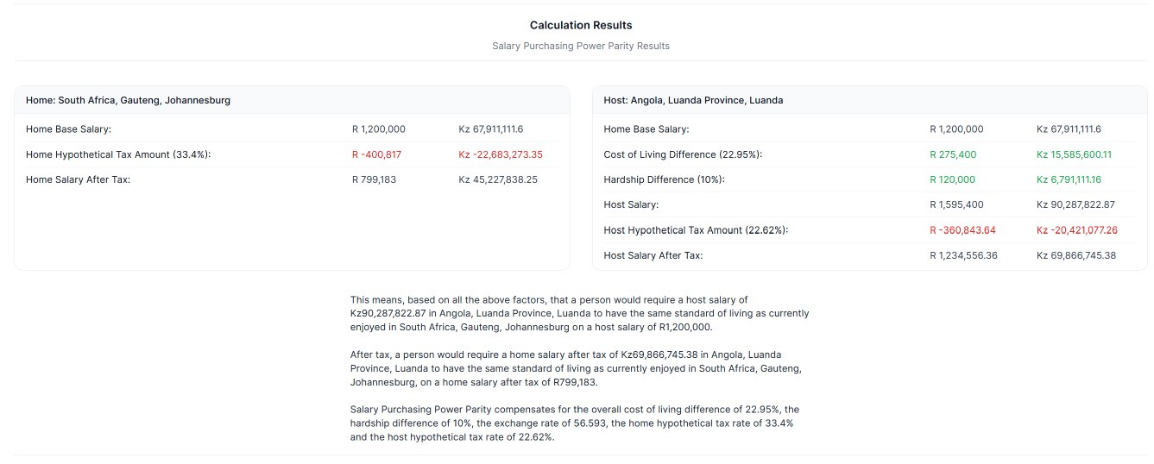
Used well, the report acts as a disciplined starting point for mobility decisions. It does not replace judgement about role value, talent premiums, housing policy, education support, or tax equalisation. It does give you a defendable baseline for the cost related portion of an assignment package and helps you explain the drivers of change to the business.
Use Xpatulator’s Cost of Living Calculators and Tools for informed decision making about the cost of living and the salary, allowance and assignment package required to maintain the current standard of living.